Zano Companion is getting a permissions system

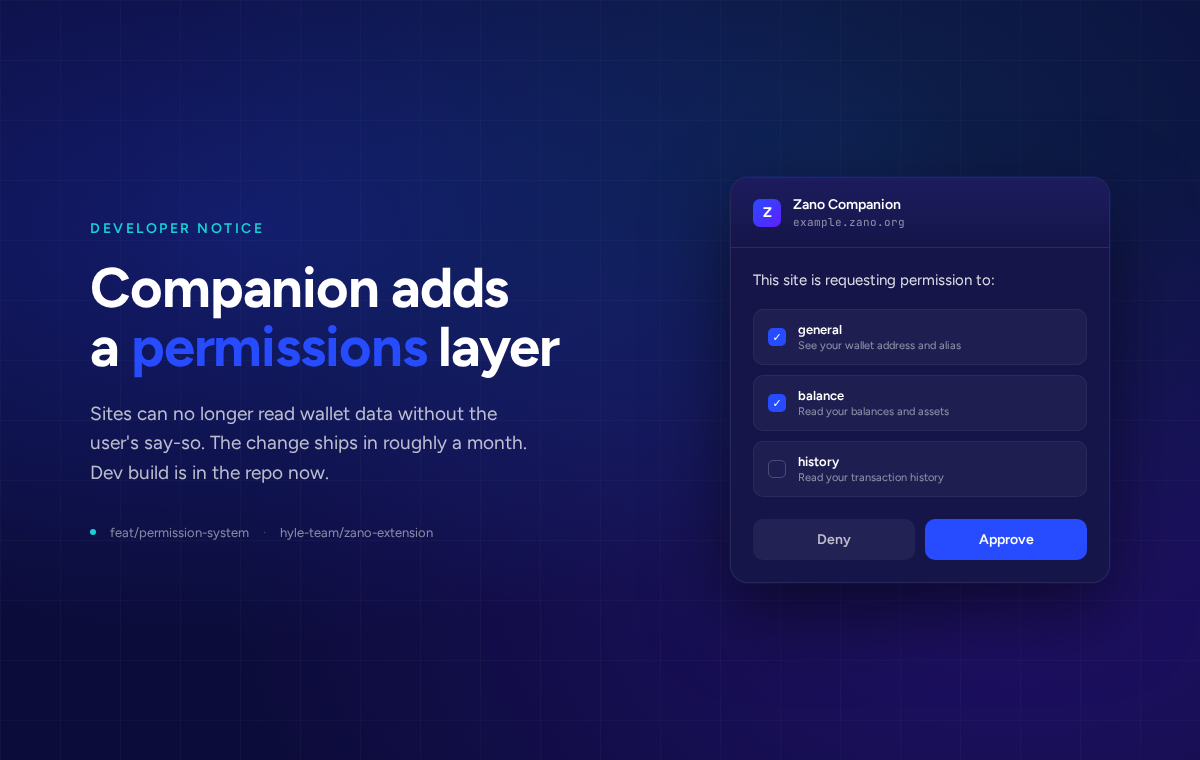
The next Zano Companion release adds a permission layer between websites and the user's wallet. Today, any site that detects the extension can read the active wallet's address, balance, and transaction history the moment the page loads. After this update, sites have to ask first.
The dev build is on the feat/permission-system branch of hyle-team/zano-extension. Public rollout is June 15, 2026. If you run a site that talks to Companion, this is the heads-up to wire in the new flow before then.
Key changes
Every site now has to ask the user before fetching wallet data or proposing transactions. The one method that works without approval is the new REQUEST_ACCESS call, and your frontend has to make it before any other request.
Permissions are scoped per origin and per wallet address. If the user switches to a different wallet, your access goes away until they switch back or grant the new wallet too.
Available permissions
| Type | Grants access to | Required for |
|---|---|---|
general |
Wallet address and alias | Every method. Must always be in the request. |
balance |
Wallet balance and assets | Methods that return balance data. GET_WALLET_DATA now omits the balance and assets fields without this permission. |
history |
Transaction history | Methods that return transaction history. GET_WALLET_DATA now omits the transactions field without this permission. |
Each type is independent. Asking for one does not imply approval of another. Multiple permissions can be bundled into a single approval prompt.
Requesting access
const result = await window.zano.request('REQUEST_ACCESS', {
  permissions: [
    { type: 'general' },
    { type: 'balance' },
    { type: 'history' }
  ]
});
Users see a popup like the one on the right. It also makes the safety guarantee explicit: the site cannot move funds without a separate approval. Permissions only affect what the site can read and what it can propose. Signing a transfer is still a per-transaction confirmation.
Response shape:
- Approved:
{ success: true } - Denied:
{ error: 'User rejected the access request' } - Already granted on a previous visit:
{ success: true }instantly, no popup
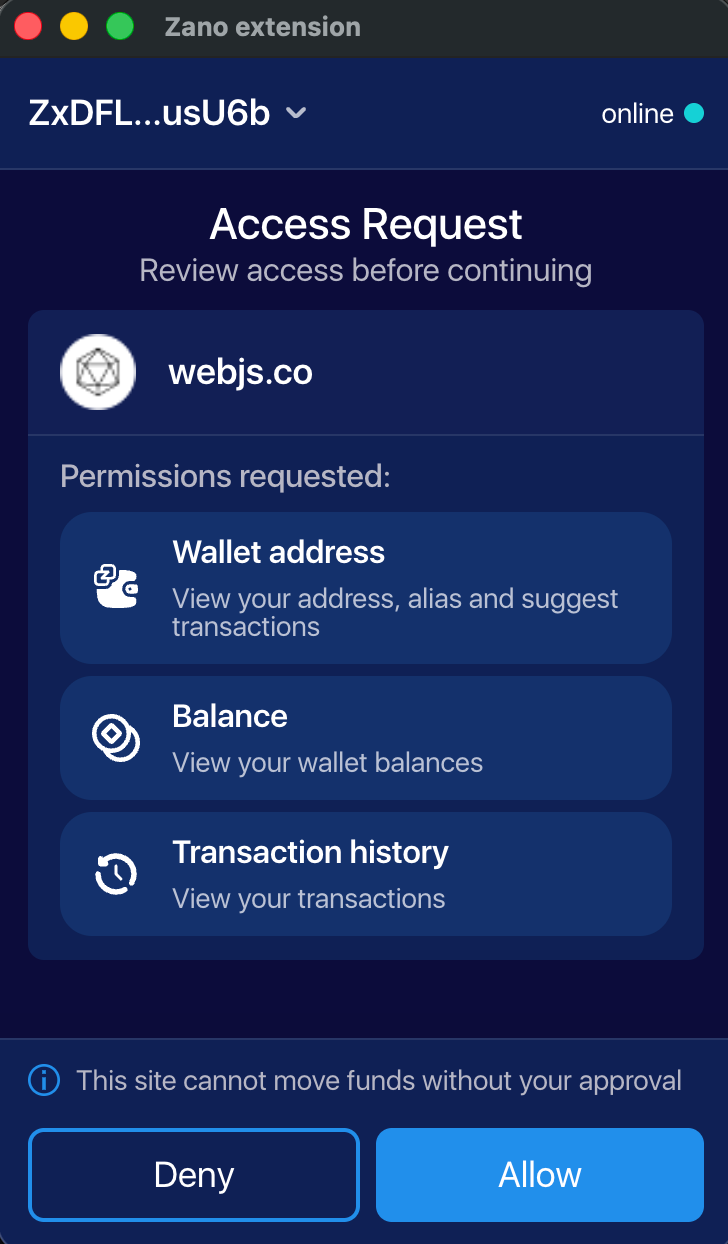
Ask for what you actually need. A read-only block explorer page usually needs general and history. A swap dApp needs general and balance. Requesting all three on a page that only shows an address looks pushy and gets denied more often.
Backwards compatibility
To keep working for users still on the old extension during the rollout window, wrap the call:
try {
  await window.zano.request('REQUEST_ACCESS', {
    permissions: [{ type: 'general' }]
  });
} catch (e) {
  if (e.error === 'Unknown method: REQUEST_ACCESS') {
    // user is on the old extension, skip and use the legacy flow
  } else {
    throw e;
  }
}
Unknown method: REQUEST_ACCESS is the signal that the user has not updated yet. Treat it as "permissions not required on this version" and proceed with your existing code path. Once the new version is the default, you can drop the fallback.
Error reference
| Error string | Cause | What to do |
|---|---|---|
General permission required |
general not granted for the current address. |
Call REQUEST_ACCESS. |
User rejected the access request |
User clicked Deny. | Do not re-prompt immediately. |
Invalid or empty permissions |
Malformed or empty permissions array. |
Fix the request payload. |
Unknown origin |
Sender origin cannot be determined (e.g. sandboxed iframe). | Check the page or iframe context. |
Request timeout exceeded |
No response from the user within the timeout window. | Retry the request. |
Request already pending |
An access request is already open for this site. | Wait for the current request to resolve. |
Unknown method: REQUEST_ACCESS |
User is on an older extension version. | Skip REQUEST_ACCESS and use the legacy flow. |
Permission denied |
Method requires a permission beyond general that was not granted. |
Call REQUEST_ACCESS again with the missing permission. |
Who needs to act
Any site that calls window.zano.request(...). The Zano-built and ecosystem surfaces, including Zano Trade, Obscura, Confidential Layer, Wrapped Zano, ZanoStats, Zanox, and Freedom Dollar, all ship updated integrations alongside the extension release.
If you run a community-built site that integrates Companion, please grab the dev build and run through your flows now. Pages that auto-trigger wallet reads on load are going to look broken until you call REQUEST_ACCESS first, and methods that used to return data silently are now going to surface General permission required and Permission denied. Existing error handlers probably don't cover those strings.
Timeline
- Now. Dev build on
feat/permission-system. Load it as an unpacked extension in Chrome or Firefox and run your integration against it. - June 15, 2026. Public release through the Chrome Web Store and Firefox Add-ons. Users get the update automatically. Sites that haven't added
REQUEST_ACCESSwill look broken to anyone on the new version.
If you need help with the migration, reach out in the Zano Discord developer channel or open an issue on the extension repo. We'll post again once the public release ships.
Why we're doing this
The old behaviour was a holdover from how Web3 wallets used to work. Any site that detected Companion could read the active wallet's address, balance, and transaction history without the user knowing. That's not how a privacy wallet should behave.
For users, nothing breaks. The first time you visit a Zano site after updating, you'll see a popup asking what to share. Pick what you're comfortable with. You can revoke later by reconnecting from a fresh wallet, or by clearing the site's permissions in the extension settings.